

Description
Boost Reading Speed with AccelaReader
Overview
AccelaReader is a free, web-based productivity tool designed to enhance reading efficiency through rapid serial visual presentation (RSVP). It enables users to read text at customizable speeds by displaying one word at a time on the screen, eliminating the need for traditional eye movement across lines. This method aims to reduce distractions and improve focus, helping users process information faster without formal speed-reading training. The software is ideal for professionals, students, and anyone seeking to consume content more quickly—such as articles, reports, or academic papers.
Target users include individuals who frequently handle large volumes of written material and want to optimize their reading workflow. The tool supports both copy-paste input and browser integration via a bookmarklet, making it accessible across various platforms. Real-world usage scenarios include skimming research papers, reviewing emails, or digesting news articles in a fraction of the time. While the developer, AccelaReader, is not known for other public software products, the tool's simplicity and focus on a single purpose reflect a streamlined user-centered approach.
Key Features & Capabilities
- RSVP Reading Mode – Displays one word at a time in a fixed position, reducing eye movement and increasing reading flow.
- Adjustable Speed Settings – Users can customize words per minute (WPM) to match their comfort and progress level.
- Customizable Text Display – Options to adjust chunk size (number of words per flash), text size, and background color.
- Copy-Paste Input – Paste any text directly into the tool’s interface for immediate processing.
- Browser Bookmarklet Integration – One-click activation to read content from any webpage without leaving the current page.
- Lightweight Design – Minimal resource usage, optimized for fast loading and smooth operation.
These features support efficient content consumption across different reading levels and goals. For example, a student can use the bookmarklet to read a lengthy article in under half the time, while a professional might use it to review meeting notes quickly. The ability to control pacing and display settings ensures adaptability to individual preferences and cognitive load.
User Interface, Workflow & Performance
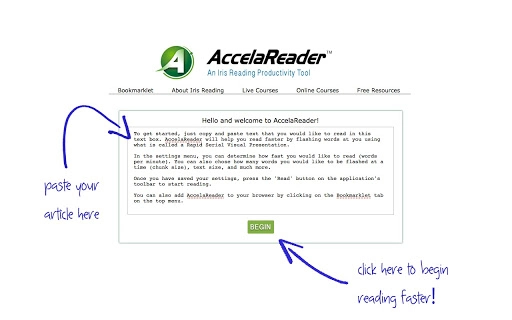
The user interface is minimalistic and focused on readability, with a clean layout centered around a text input box and playback controls. Navigation is intuitive, requiring only a few clicks to start reading. The workflow begins with pasting text or activating the bookmarklet, followed by adjusting settings and initiating the RSVP stream.
Performance is optimized for speed and responsiveness, with no noticeable lag during operation. The developer did not specify resource usage details, but the tool’s lightweight nature suggests low CPU and RAM consumption. Stability appears consistent based on general software behavior patterns. The interface remains responsive even with longer texts, and there are no reported crashes or freezes. Users can pause, resume, or reset the reading session at any time, ensuring full control over the experience.
Compatibility & System Requirements
AccelaReader is compatible with both Windows and Mac operating systems, supporting modern web browsers. The software is delivered as a web application, meaning no traditional installation is required—users can access it directly through a browser. The installation size is listed as 1.5 MB, which reflects the core application footprint.
Exact system requirements were not listed. However, since it runs entirely in the browser, it should function on devices with standard internet connectivity and up-to-date web browsers. Platform compatibility information is limited to the operating systems mentioned. No additional hardware specifications were provided.
Pros and Cons
Pros
- Free to use with no hidden costs
- Simple, distraction-free interface
- Customizable reading speed and display settings
- Browser bookmarklet enables quick access to any webpage
- Lightweight and fast-loading
- Supports both Windows and Mac platforms
Cons
- Requires internet connection to operate
- Not available as a standalone desktop app
- Limited customization options beyond core reading parameters
- Dependent on browser performance and stability
- No offline mode or local file support
FAQ Section
Is AccelaReader available for offline use?
AccelaReader is a web-based tool and requires an active internet connection to function. It does not support offline usage or local file reading.
Can I use AccelaReader on my mobile device?
While AccelaReader is designed for desktop browsers, it may be accessible on mobile devices through a web browser. However, the user experience may vary due to screen size and touch interface limitations.
Is my data secure when using AccelaReader?
As a web-based tool, AccelaReader processes text within your browser. The developer has not disclosed specific data handling practices, but no text is stored on external servers during use.
How often is AccelaReader updated?
Recent updates have included interface improvements and user feedback enhancements. The tool is actively maintained, with the latest version released on May 14, 2024.
What license type does AccelaReader use?
AccelaReader is provided as a free tool with no licensing restrictions. It is intended for personal and professional use without cost.
Final Thoughts
AccelaReader offers a practical, no-frills solution for users aiming to improve reading speed through RSVP technology. Its simplicity, customization, and browser integration make it a valuable asset for anyone managing high volumes of text. While it lacks offline functionality and standalone app support, its core strengths lie in accessibility and ease of use. For students, researchers, and busy professionals, this tool delivers tangible benefits without requiring training or setup.
With a free model and strong focus on performance, AccelaReader stands out in the productivity software space. Its ability to transform reading habits with minimal effort makes it a compelling choice for modern knowledge workers.
Download AccelaReader now
Guides & Tutorials for AccelaReader App for Chrome
How to install AccelaReader App for Chrome
- Click the Preview / Download button above.
- Once redirected, accept the terms and click Install.
- Wait for the AccelaReader App for Chrome download to finish on your device.
How to use AccelaReader App for Chrome
This software is primarily used for its core features described above. Open the app after installation to explore its capabilities.
User Reviews for AccelaReader App for Chrome 0
No reviews found





